Friday, October 2, 2020

Best Live Chat Software

Disclosure: This content is reader-supported, which means if you click on some of our links that we may earn a commission.

Live chat has quickly become an integral part of customer service in the digital era. 

When a customer or website visitor has a question, complaint, or needs some other type of assistance, they expect to reach your brand via live chat.

In addition to the improved customer experience, live chat is also more efficient for your support team. Service reps can’t field more than one phone call simultaneously, but they can handle multiple live chat conversations at the same time.

Overall, live chat is fast, effective, and more cost-efficient than any other type of customer communication. In terms of consumer preferences, it ranks higher than phone, email, and social media. Every website needs to have live chat.

With that said, there are dozens of different live chat solutions available on the market today. Which one is the best for you and your website? Continue below for my in-depth analysis.

The Top 7 Options For Live Chat Software

  1. Zendesk
  2. JivoChat
  3. Pure Chat
  4. Intercom
  5. LiveChat
  6. Acquire
  7. Smartsupp

How to Choose the Best Live Chat Software For You

As you’re comparing different live chat options, there are certain feature sets and considerations that must be evaluated. I’ll break these factors down in greater detail, so you have a better understanding of what to look for. 

Number of Agents

How big is your support team?

There’s a big difference between businesses with 5, 50, and 500 agents. Most plans will have some limitations on how many support reps can access the software. Other plans will have minimum seat requirements as well. 

It’s also important for you to look down the road as your company grows. Is it easy to add new agents to your plan at scale? Make sure you’re not locked into a plan that restricts your scalability.

Use Cases

Why exactly are you in the market for live chat software?

Sure, there are plenty of general-purpose options out there. But some software is designed to accommodate specific needs and goals. For example, there is live chat software for lead qualification, live chat software for customer engagement, and live chat software for customer support. 

These are just a few of many examples that should be taken into consideration. 

Omnichannel Support

If you’ve got customers reaching out to your brand on different channels, you want to make sure that the software seamlessly integrates with those third-party systems.

For example, you could potentially manage conversations from your website and conversations from Facebook Messenger within the same live chat software. Your service reps can handle everything from a single dashboard, instead of switching screens and being forced to use different platforms. 

Automation

Automation is arguably the most crucial and desirable feature of live chat software. It speeds up service requests significantly, and it’s a cost-effective way to provide assistance 24/7/365.

Chatbots don’t take lunch breaks or sick days. They work nights, weekends, and holidays. So if a website visitor has a question at 2:00 AM on a Saturday, it can potentially be resolved with a self-service chatbot. 

For businesses with multiple departments, chatbots and live chat software can automatically route messages to the right representative. Questions about returns would be sent directly to a support rep, while questions about new products would be routed to a sales rep.

Extras and Bonus Features

Aside from the core live chat software tools, each software will offer additional features with different plans. Not all of these will be a deal-breaker, but it’s helpful to have if you’re going to take advantage of these offerings.

I’m referring to features like CRM integrations, chat history, custom widgets, admin monitoring, helpdesk features, HIPAA-compliance, calendar integrations, appointment scheduling, etc.

The Different Types of Live Chat Software

At its core, live chat software is essentially real-time messaging on a website between a visitor and brand representative from a chatbox on the corner of the page. But within this broad classification, live chat can be segmented into three main categories.

Chatbots

Chatbots use AI technology and automation to solve problems. In many cases, customer inquiries can be resolved without any human interaction if you add chatbots to your website. 

It’s also common for sites to use chatbots initially, before ultimately routing the conversation to a support representative. Chatbots can help qualify the visitor and ultimately get the inquiry resolved faster.

Chatbots typically won’t come standard with basic live chat software plans. These are usually offered as an add-on. Don’t let the price of chatbots scare you away from using them. Over the long-term, it’s much cheaper to use bots than paying for human labor. 

Live Chat For Sales

There are lots of great sales-specific live chat solutions out there. This type of live chat software will include built-in CRM tools (or integrate with the CRM you’re already using), lead qualification features, and customer engagement tools.

Your sales agents will have a much easier time closing leads if you’re leveraging live chat software built for sales. 

Customer Support Software

Live chat is a common component of helpdesk software. Lots of customer service software on the market will have features for things like ticket support and team collaboration, but the best ones will also include live chat. 

Not every live chat software is built specifically for customer support. So if this is the primary feature that you’re looking for, make sure you choose a solution with those helpdesk features and support tools. 

#1 – Zendesk Review — Best For Customer Engagement

Zendesk is a versatile live chat software trusted by 200,000+ businesses worldwide. They have solutions for sales, support, and customer engagement. 

One of the reasons why Zendesk ranks so high on my list is because of its simplicity. The software is easy to use, and you can deploy it within hours of signing up.
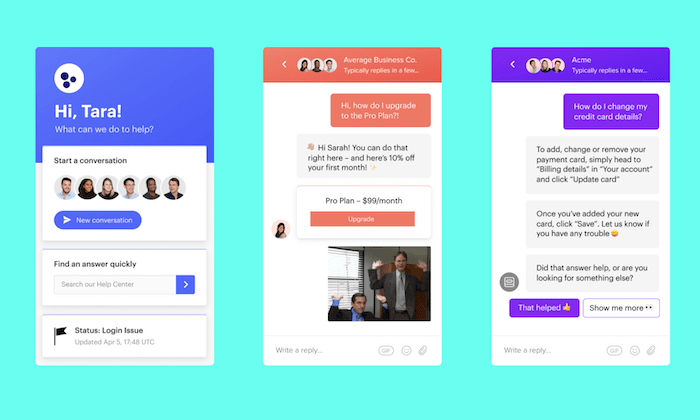
Zendesk is used by some big names and industry leaders, like Shopify, Slack, Uber, Venmo, and more. Here are some of the top reasons why I recommend it:

  • Reach out to customers with proactive engagement before they land on your site
  • Powerful analytics customer satisfaction, agent performance, and other KPIs
  • Omnichannel support with email, social, phone, and live chat
  • Self-service and knowledge base tools in 40+ languages
  • AI suggestions and machine learning from context clues

Zendesk Chat starts at $14 per agent per month. 

But I recommend the Zendesk Support Suite. This package comes with features for chat, support, messaging, and voice, starting at $89 per month. It’s also worth noting that Zendesk has a Sales Suite to consider as well. 

Try any Zendesk plan free for 30 days. 

#2 – JivoChat Review — Best Cross-Platform Live Chat Software

JivoChat is branded as an all-in-one business messaging solution. It allows you to communicate with customers via phone, email, social, and of course, live chat—all from a single platform.

It seamlessly integrates with popular tools and services that you’re already using, like Slack, Weebly, WordPress, Wix, Pipedrive, Zapier, Shopify, and more.
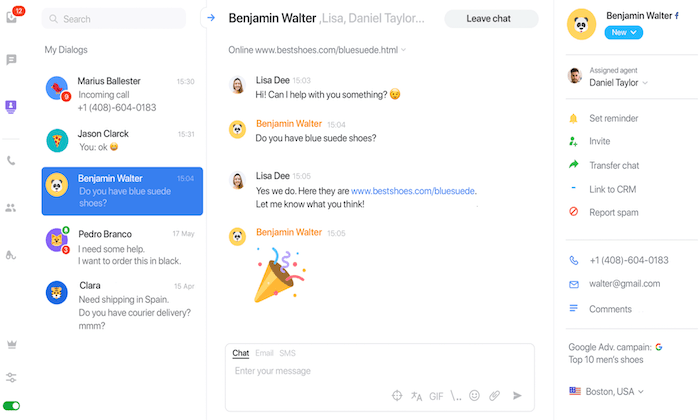
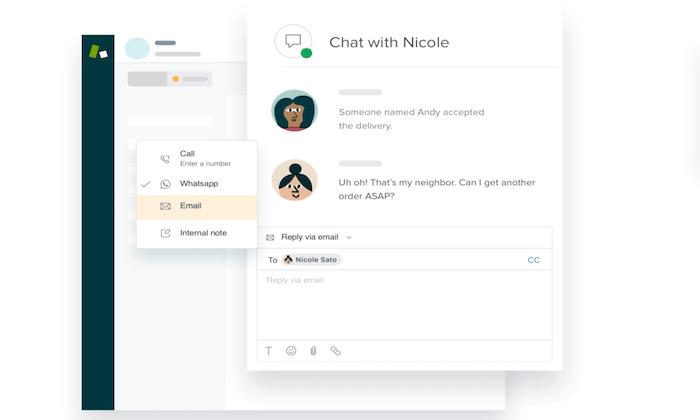
More than 284,000 websites worldwide rely on JivoChat for their live chat needs, making it one of the most popular solutions on the market today. Here’s a quick overview and explanation of why the software is so popular:

  • Compatible with Facebook, WhatsApp, Apple Business Chat, Telegram, Email, etc.
  • All customer communication is managed from a single window
  • The live chat widget works on every device, browser, and operating system
  • It’s customizable and has the ability to be translated into 20 different languages
  • Automatic proactive messages based on custom triggers
  • CRM integrations and visitor’s information (like location and click source)
  • Chat logs and reports between customers and agents

JivoChat offers unlimited chats and websites on every plan, including the free version.

The software and its basic features are free for your first five agents. Pricing starts at $13 per month per agent, which gives you access to all of JivoChat’s features. Try it free for 14 days.

#3 – Pure Chat Review — The Best Live Chat Features

Pure Chat is an excellent live chat solution for small and medium-sized teams. 

Compared to other solutions on the market today, Pure Chat is one of the most feature-rich live chat tools that you’ll come across. Even better, all of these features are included with every plan.
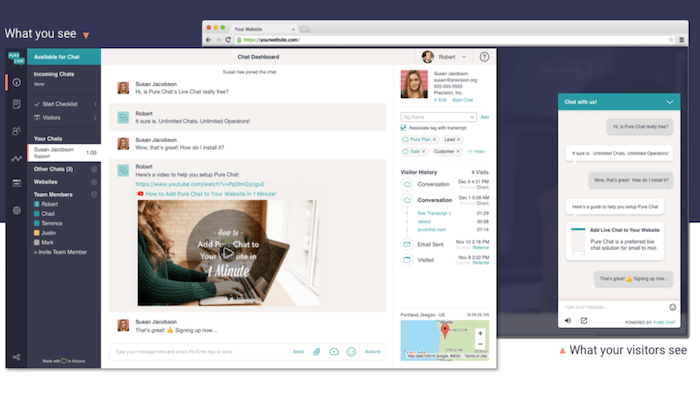
Let’s take a closer look at Pure Chat’s extensive feature list:

  • Unlimited chats
  • Advanced widget customization
  • Security roles (for admins, operators, power users)
  • Chat notifications
  • Canned responses
  • File transfers
  • Trigger-based actions
  • Real-time analytics and visitor tracking

There are two different Pure Chat plans for you to choose from—Growth and Pro. These start at $39 and $79 per month, respectively. The Growth plan comes with four users, and the Pro plan comes with ten. Additional users cost extra.

For most businesses, I’d recommend the Pro plan. It gives you the ability to remove Pure Chat’s branding from your widget, and you can use it on an unlimited number of websites.

Try either of these Pure Chat plans free for 30 days to access all of the features.

#4 – Intercom Review — The Best For Lead Qualifications

Intercom is branded as a “conversational relationship platform.” It’s a clever way to say it helps you build customer relationships through messaging and live chat.

The software is trusted by 30,000+ companies across the globe, including Microsoft, IBM, Udemy, and Sotheby’s.

What makes Intercom so great? Let’s take a closer look at the software highlights:

  • Boost site conversions with targeted messages, bots, and real-time chat
  • Onboard, activate, and re-engage customers with outbound communication
  • Proactive support tools and self-help features
  • Manage customer interactions across all channels from a single dashboard
  • 250+ integrations out-of-the-box and APIs for custom integrations

The software starts at $39 per month for basic live chat and outbound messaging features. 

To take advantage of automation and managing lead qualifications at scale, I recommend the Accelerate plan. It starts at $499 per month and includes ten seats. This comes with awesome features like custom bots, team inboxes, and more. 

Try Intercom for free with a 14-day trial.

#5 – LiveChat Review — The Most Versatile Live Chat Software

With a brand name like LiveChat, it’s no surprise to see this software rank so high on my list. This tool is trusted by 30,000+ businesses in over 150 countries, including names like PayPal, McDonald’s, Adobe, and Mercedes-Benz.

The software is used for online chat, multichannel support, lead generation, online surveys, in-app support, net promoter score, and more—making it one of the most versatile solutions on the market today.
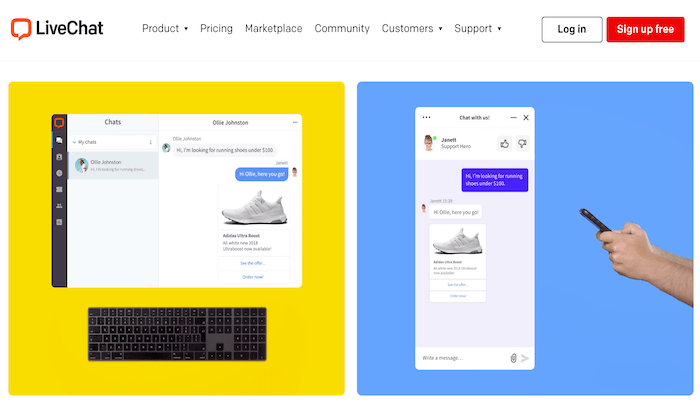
Here’s a brief overview of the features, benefits, and noteworthy highlights of LiveChat:

  • Add product cards to live chat conversations
  • Use custom forms and AI chatbots to qualify your leads
  • Automatically track sales and KPIs to monitor the effectiveness
  • Automatic agent routing
  • Automatic ticket creation
  • Segment visitors based on their behavior on your site
  • 170+ integrations (Dropbox, BigCommerce, MailChimp, Shopify, Salesforce, etc.)

LiveChat is easy to use and set up as well. Plans start at $16 per agent per month, and you can try it free for 14 days; no credit card required. 

#6 – Acquire Review — Best Live Chat Software For Chatbots

Acquire isn’t the most popular live chat software on the market today. But it’s still trusted by large organizations like Lexus, Audi, the US Air Force, Discover, and more. It’s an all-in-one solution for omnichannel support, knowledge base, video chat, VoIP phone, and more.

For those of you looking to add the most advanced chatbots to your website, Acquire is my top recommendation.
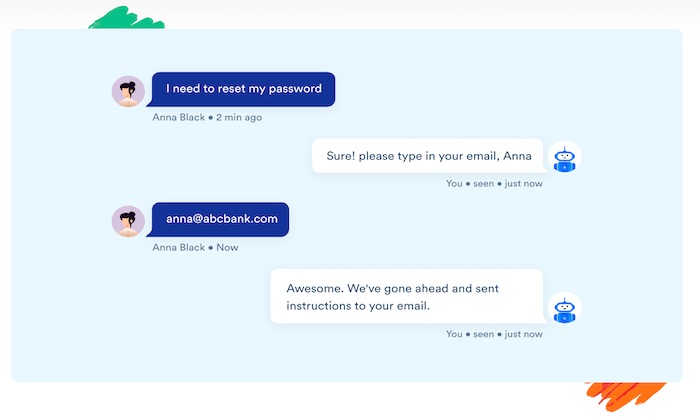
Let’s take a closer look at what makes Acquire stand out from the crowd:

  • Automate routine questions with AI chatbots
  • Sync your knowledge base articles with chatbots
  • Route chats to human agents when bots can’t provide a solution
  • No coding needed or developers required to deploy bots
  • Manage all email, social, live chat, and other channels from a single inbox
  • Team collaboration tools
  • Co-browsing software for troubleshooting with on-page markups
  • Video chat with customers

Another reason why I like Acquire is because the company provides exceptional customer support. It’s a growing brand, but their team is still available to accommodate your needs, 24/7.

Pricing is not available online. Contact the Acquire sales team for more information.

#7 – Smartsupp Review — Best For Monitoring Visitor Behavior

Smartsupp is another live chat software with omnichannel capabilities. The solution is used by over 425,000 websites.

It’s a great way to increase customer loyalty, drive conversions, and improve engagement with live chat and bots.
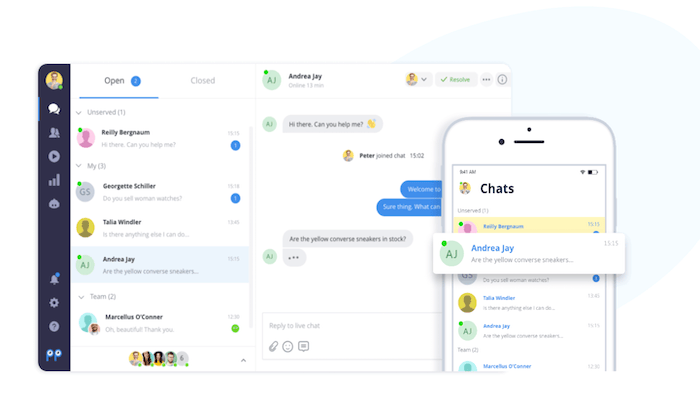
Smartsupp has one of the most unique features of all live chat software on the market today. It has built-in video recordings that give your agents a deeper understanding of how each visitor is moving around on your site. This gives you agents the ability to discover where people are getting lost, so they can provide better support. 

You’ll also benefit from top features like:

  • Out-of-the-box integrations and APIs
  • Analytics and customer satisfaction ratings
  • Create personalized automated messages with smart rules
  • Communicate with customers while on the go from Smartsupp’s mobile app
  • Web dashboard with analytics about customers
  • Customize the look and colors of chat box
  • Add personalized photos to support agent names in the chat widget

For smaller websites with basic needs, Smartsupp is free forever for your first three agents. Paid plans start at $10 per month. 

You can try Smartsupp today by creating a free account. 

Summary

There are lots of great live chat solutions available. But the seven recommended in this guide are definitely my favorite.

Which one is the best option for your website?

Be sure to follow the methodology I outlined earlier in this guide. This will make it much easier for you to narrow down your options. 

The post Best Live Chat Software appeared first on Neil Patel.

from Blog – Neil Patel https://ift.tt/3jldPXg


from WordPress https://ift.tt/36yoIlb

The 5 Best Reputation Management Companies of 2020

Researchers at Womply analyzed 200,000 small businesses in every state, looking at a few dozen industries. 

They found that businesses with more than 82 total reviews earn 54 percent more money. It isn’t just about getting reviews either. Businesses achieved moderate to large jumps in revenue from the simplest tasks. Claim your profile on at least four review sites? You earn 58 percent more revenue. Businesses that reply to their reviews 25 percent of the time earn 35 percent more revenue. 

Here’s the problem many businesses run into. 

They don’t know what they’re doing. Most know how to ask customers for reviews, but they’re unsure how to handle the other important parts of reputation management. 

This is why it’s important to get help. 

If you have the right reputation management company, you’ll have the help you need to improve your company’s online reputation.

The 5 Top Reputation Management Companies in The World

Here’s a shortlist of some of the best reputation management companies in the world. You can use review sites like Clutch.co, HubSpot Agency Directory, or Sortlist if you’re looking for something more specific in the reputation management industry. 

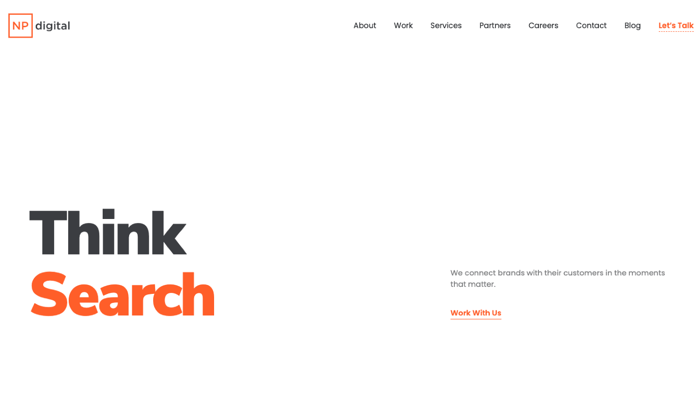
1. NP Digital – Best for Local SEO and Reputation Management

NP Digital is my agency. If you’re familiar with my work, you know that I have a strong background in search engine optimization and digital marketing. I built an agency called Pronet Advertising more than 17 years ago, while I was still in high school. 

It’s hard to believe that I’ve been a marketer for more than 20 years! That’s given me a lot of time to learn how reputation management integrates with local search, content marketing, social media marketing, and advertising. I took all of the lessons I’ve learned from the companies I built — Kissmetrics, Crazy Egg,  Pronet, Quicksprout, NeilPatel.com, and now NP Digital.

My agency is a little bit different from other agencies. 

NP Digital ties all of our work back to revenue. It’s no different with our reputation management campaigns. If you’re going to put a dollar into your campaign, you want two dollars back, right? My agency focuses on driving real business results, so your company continues to grow; our work has to make money for your business. 

NP Digital’s client list includes:

  • Facebook
  • Viacom
  • Google
  • GM
  • eBay
  • NBC
  • Thomson Reuters foundation
  • TechCrunch
  • Cheezburger
  • American Greetings

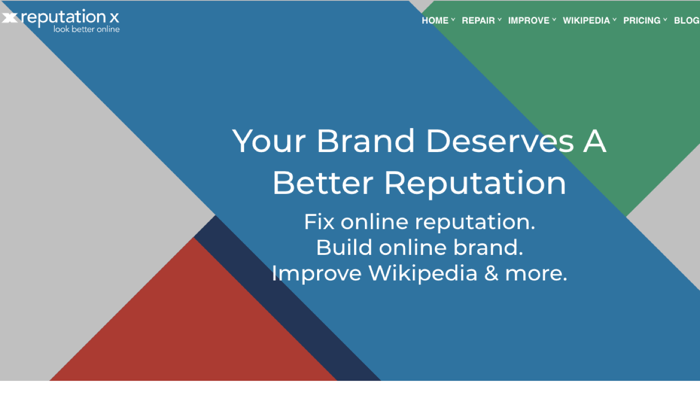
2. Reputation X – Best for Reputation Recovery

Reputation X offers proactive and reactive services, but they lean more towards the reactionary side of reputation management. 

Proactive reputation management options include — content development (articles, reviews, news, blog posts, ratings, etc.). Reactive reputation management options include takedown services, including  — SERP removal, search result suppression, DMCA removals, reputation protection, and content suppression. 

Reputation X has more than 15 years of experience in the industry. What’s significant about their service is the fact that they’re comfortable working with organizations and individuals. 

“Confidential clients include Heads of State, Politicians, SMBs, Celebrities, Public Relations Agencies (white label), and just regular folks.”

 According to their website and marketing materials, they avoid pre-made campaign templates, which are common in the industry. They build each campaign from scratch, which makes sense when you realize that their service starts at $10,000. As expensive as their services are, they’re not for everyone. 

“The Reputation X client acceptance process is unique. Prospective new clients must be approved not only by management but by team members as well. That means many never become clients. In addition, prospective customers whose reputation management problems seem too tough to overcome are always informed of the fact. Alternatives are clearly explained, even if they never become a client.”

They’re pretty picky about the clients they choose and the work they accept.

Reputation X’s confidential client list includes:

  •  Law firms 
  • Healthcare organizations
  • Fortune 500 executives
  • Manufacturing firms
  • Public Relations companies

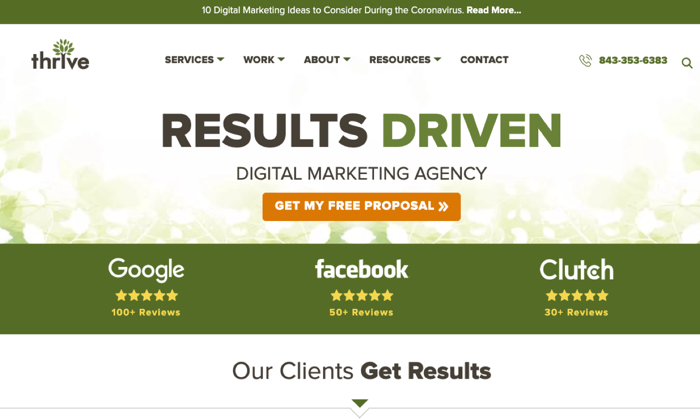
3. Thrive – Best for Small Business Review Management

Thrive is a full-service agency that offers reputation management and reputation repair services. Thrive offers reputation management and repair services on their website; take a closer look at their website, and you’ll find that they’re really focused on the online review side of things. 

If you’re looking for a reputation management firm with the legal and takedown chops to protect your business Thrive isn’t the reputation management company for you. If you’re looking for an agency that can generate a huge amount of reviews, Thrive may be a good fit. If you’re looking for an agency that’s oriented around small businesses, winning new customers over or burying negative press Thrive is a great place to start. 

Thrive offers most of the services a full-service agency provides. If you’re looking for a Jack of all trades, their agency has experience in several areas; this works especially well for inexperienced small business clients who need help with multiple services. 

Thrive Agency’s client list includes:

  • Nationwide Construction
  • Ready Seal
  • Bonds Ellis Eppich Shaffer Jones
  • Max Mechanical
  • Quick Roofing

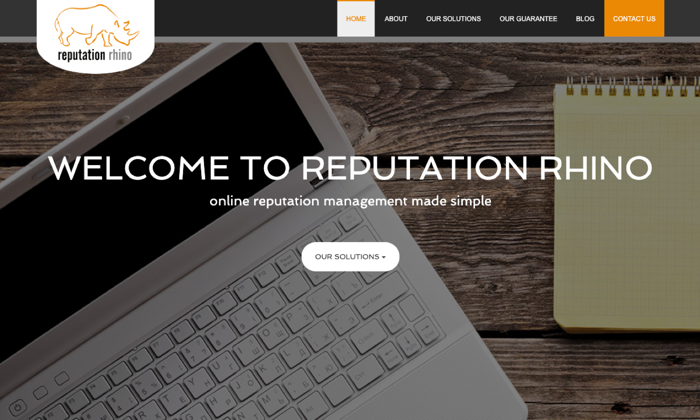
4. Reputation Rhino – Best for Individuals

Reputation Rhino specializes in online reputation management; they serve small- and midsize businesses and individuals. Since then, they’ve expanded to create a range of brand management and internet marketing services that they offer to companies and individuals. 

All of the services they now offer — SEO, PPC, Social media, Web development — they’re all geared around their reputation management services. 

It’s not as common, but Reputation Rhino offers clients a money-back guarantee.

They offer reputation management and repair services; One thing that’s surprising about their business is the fact that they’re able to remove negative reviews from online review sites like Glassdoor, Ripoff Report, Google Images, and more. 

Their agency is small but so is the price; campaign pricing starts at $1,000. 

Reputation Rhino’s client list includes:

  • Colleges
  • Reputation management companies 
  • Law firms
  • Local businesses 
  • Retail storefronts
  • Tech companies

5. Reputation Defense Network – Best for Reputation Management Specialist

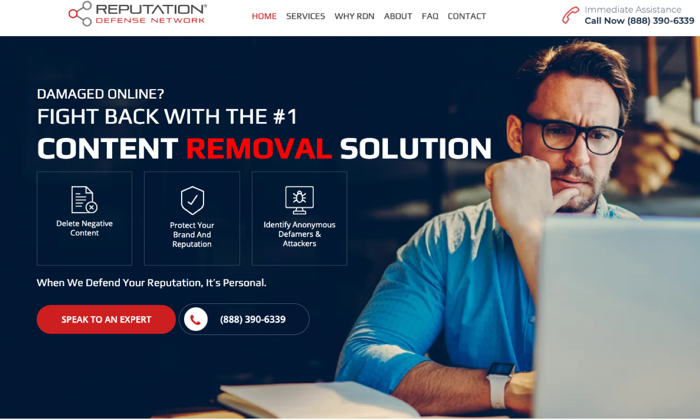
The Reputation Defense Network specializes in one thing: Content removal. They focus their attention on deleting negative or malicious content, protecting client brand reputation, and identifying anonymous hackers, defamers, and attackers. They also include proactive reputation management services, but their focus is geared around takedowns. 

Here’s how they describe their service: 

“Reputation Defense Network is one of the fastest-growing Internet Content Removal companies in the US. We are the only company to offer guarantees on all of our work. We are not an SEO or marketing firm disguised as a reputation management company.  Our focus is your reputation, nothing else.”

They use their 27-point removal audit to remove negative content permanently. They focus first on removal, then suppression. One thing that makes their value proposition unique is the fact that they offer cyber investigation services. 

If you’re looking for a reputation management company with a significant amount of firepower and legal muscle, the Reputation Defense Network is a good fit. Their services are perfect for high-stakes reputation management — the kind that includes blackmail, fraud, defamation, etc. 

They provide performance guarantees on all of their work: “you don’t pay until we provide you with a favorable result.”

That’s $0 upfront, 100 percent (permanent) content removal with an average turnaround time of 72 hours. If you’re in a competitive industry and you’re dealing with confidential, high-stakes information, this agency is a good fit. The majority of their clients are growing, mid-market firms in the $10M to $1B range. 

They serve clients in the following industries: 

  • Business services
  • Healthcare and medical
  • Education

4 Characteristics That Make a Great Reputation Management Company

When you’re vetting an agency, you’ll want to find a company that displays the right characteristics. The last thing you want is to choose a reputation management company that makes your reputation worse. When you’re searching for the right agency, here are some attributes to keep in mind. 

1. Their agency approach is proactive and reactive 

The industry has matured quite a bit since reputation management of the 90s. Back then, agencies were focused on simply burying negative content. That’s still doable, but it’s much easier to guide the conversation from the start. 

Asking customers to share their feedback via online reviews. Creating, claiming, and optimizing your review profiles; responding to customer feedback, these are all proactive  methods you can use to improve your reputation. Deleting or burying toxic, inaccurate, or misleading content, sending out legal takedown notices, and working with law enforcement are reactive strategies. 

You need both, but these strategies don’t provide a complete picture of online reputation management campaigns on their own.

2. They focus on building relationships

Old-school campaigns are focused primarily on silencing critics, enemies, and opponents. New-school agencies still have those skills if they need them, but they choose to focus their attention on building relationships with customers. 

  • Helping you take care of your customers
  • Requesting reviews from customers 
  • Building reviews up on the right platforms
  • Generating publicity and increasing visibility
  • Responding to unfair attacks
  • If you’ve made a mistake, they’ll help you earn a fresh start

You need an agency that understands both sides of reputation management. 

3. They realize reputation management is ongoing

This doesn’t mean that your agency is trying to lock you into an unnecessary contract. Customers feel reviews older than three months are irrelevant. Agencies realize customers want to see consistent proof that you’re still performing well. 

Reputation and reviews, they decay over time. 

Your agency should provide you with an ongoing service that’s optional; they should provide you with the people, processes, and tools you need to manage your reputation well. They should have a team in place to manage outreach with customers, publications, and press. 

4. They’re local search experts

Your reputation management agency should have experience in running and managing local search campaigns.

You want this because local searches are growing 50 percent faster than mobile search. As far as Google is concerned, online reviews are part of the local ranking factors that determine your rank and performance. 

When it comes to local search, your reputation management company should have expert-level knowledge. They should know how to increase search engine and social media visibility. The easier it is for them to integrate local search, the better your reputation management campaigns will perform. 

What To Expect From a Great Reputation Management Company

Here’s a shortlist of the things you should expect from your agency. 

  1. They’ll show you the plan ahead of time: Your agency will provide you with an A to Z plan, outlining the macro and micro level components of your campaign. You should know exactly what you’re getting into — what your campaign costs, what their goals are, how long it will take to reach those goals and the reports they’ll provide. 
  2. Openness and complete transparency: Your agency should answer all of your questions and concerns; this isn’t optional or negotiable. Your agency isn’t writing copy or designing a website. They’re working with your reputation, so the impact on your business is huge. You need to know exactly what they’re doing and how they’re doing it. 
  3. Consistent communication: Your agency should provide you with constant communication, feedback, and reporting. You’ll need to provide them with the decision-makers and influencers who need to be part of the conversation. 

You should see evidence of this before you sign on the dotted line. If agencies hide behind proprietary software or secret processes, you’ll want to walk away. 

Conclusion

Reputation management is easier when you have the right company behind you. Many businesses don’t know what they’re doing. Most know how to ask customers for reviews, but they’re unsure how to handle the important aspects of reputation management. 

If you feel the same way, it may be a good idea to get help. 

Businesses that handle reputation management will see consistently large jumps in revenue. Completing simple tasks — claiming your review management profiles, responding to customers online, and requesting reviews — good reputation management leads to more revenue. 

Use our guide to find the reputation management companies that are right for your business. Set your values, expectations, and needs ahead of time, and you’ll find choosing the right company is easy. 

The post The 5 Best Reputation Management Companies of 2020 appeared first on Neil Patel.

from Blog – Neil Patel https://ift.tt/2SlSYqU


from WordPress https://ift.tt/30taCh7

A Quick Guide to Using Keywords for Better Amazon SEO

amazon seo keywords

As the world’s largest e-commerce store, Amazon is a platform sellers can’t afford to ignore. But on a website selling over 12 million items, how do you help your products stand out from the crowd with Amazon SEO?

It’s easier than it sounds.

Why? Because Amazon isn’t just an e-commerce platform. It’s a search engine with its very own algorithm, A9

A Short Introduction to Amazon SEO

Just like other search engines, you can use SEO techniques to boost product rankings. You use certain phrases to boost your discoverability in organic searches, which can increase sales with Amazon.

Here are other ways Amazon acts like a search engine: 

  • Customers type queries into the search box.
  • The Amazon algorithm presents what it thinks are the most relevant results.
  • If the results are good, customers won’t go past the first page. Why? Because they’ve found what they’re looking for.

Remember, the whole point of Amazon is to sell things.

Amazon wants to match customers and sellers. They want customers to be happy with the search results so they’ll become repeat customers.

While there’s no guarantee you’ll secure a first-page spot on Amazon, who wants to be on page 20? You’ll never reach your target audience that way.

Let’s look at using keywords for proper optimization of your product pages.

How Do Amazon SEO Keywords Work?

Amazon keywords are the search terms (i.e., words and phrases) that people type into the Amazon search bar.

If you don’t include the right keywords:

  • Your target audience won’t find your listing
  • Your conversion rate falls flat
  • Your discoverability drops

Here’s an example:  

Someone searches for a “frying pan.” “Frying pan” is the Amazon keyword. If you’re selling frying pans, but you call them an egg pan, you’ll miss the target audience.

We can take this a step further. “Frying pan” is a good keyword, but it’s may not be enough to hit a first-page ranking. Why?

It’s really broad.

Chances are, customers want more than just a frying pan. Maybe they want one with a lid, or a non-stick pan or a cast-iron frying pan.  

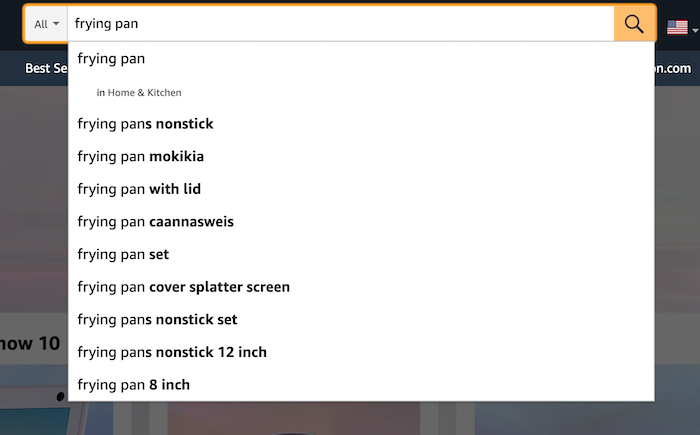
Luckily, Amazon’s algorithm understands this. Whenever you type a key phrase into the search bar, other suggestions pop up. Amazon bases its suggestions on other customer search terms, just like Google Autocomplete.

Amazon SEO feature: search autocomplete suggestions

For example, if someone searches for “frying pan”, the first predicted suggestion they see is “frying pans non-stick.”

That’s because other customers often search for non-stick pans…and guess what? You’ve just found yourself another keyword.

The more relevant Amazon keywords you use, the better your chances of reaching your customer base (within reason, but we’ll get to that.)

What have we learned here?

  • Amazon keywords are search terms.
  • To increase your discoverability on Amazon, you need to include the right keywords in your product listings.
  • Some keywords are a little too broad on their own.
  • Including a few specific keywords can help you reach your audience base.

Essentially, think of Amazon keywords as another tool in your digital marketing toolbox. Once you know how to use them, they can increase your brand awareness and potentially boost sales.

Is There Anything I Shouldn’t Do With Amazon SEO?

Actually, yes. You shouldn’t use “black hat” tactics.

Black hat SEO is when you deliberately try to manipulate your page rankings using less than ethical strategies. These strategies include:

Sure, you might get a short-term boost in rankings if you use black hat techniques. But the drawbacks aren’t worth it.

Black hat strategies violate Amazon’s Terms of Service. If Amazon catches you manipulating the algorithms, they could:

  • Lower your position within the search results
  • Remove your product listings from the search results completely
  • Suspend or permanently close your account

I’m very much a believer in sticking to “white hat” or fair SEO practices.

If you’re in this for the long game, then I suggest you do the same.

How to Make Amazon Keywords Work for You

When you’re selling products on Amazon, you want to avoid overusing keywords to diminish the user experience and a high bounce rate.

The high bounce rate metric measures when someone clicks on your listing, takes a look around, and leaves pretty quickly. This action tells Amazon that users aren’t finding what they’re looking for from your product. The outcome? Your discoverability drops, and your product is shown less in Amazon SERPs.

Here’s what you need to optimize to avoid keyword stuffing and a high bounce rate:

Product Title

Always put the most important keyword(s) in the product title. If you’re selling a vacuum cleaner, make sure “vacuum cleaner” is in the title.

The title should include:

  • The item’s brand name (this is a super important keyword, by the way)
  • A description of what the item is, such as “vacuum cleaner “
  • The product color and size

There’s no need to go overboard — remember, you don’t want to keyword stuff.

Backend Keywords

Let’s be honest…sometimes users misspell product names. Or maybe they want a product like yours, but they don’t use the exact key phrase.

You still want these people to find your listing, but you can’t include all these potential keywords in your title.

What do you do to ensure people still see your product?

You put these Amazon SEO keywords in the “backend” of your Amazon Seller’s account.

These are ‘hidden’ key terms added to your listing when you create it. You only have about 250 characters, so use them wisely.  

Brand Name

Sometimes people are looking for a specific brand, such as Levi jeans or a Lodge frying pan. For sellers, this means you must include an accurate brand name on your product page.

A bonus? Even if you’re a relatively new brand or seller, you can increase your brand awareness among your target audience by using brand names for the products you sell.

Remember to spell brand and product names correctly; you don’t want people missing product listings because of incorrect names they aren’t searching for.

The Product Listing Description

The product description is where Amazon keywords count. If your descriptions don’t convince people to buy, they’ll bounce off the listing which can naturally decrease your conversion rate.

How do you make the most of this space?

  • Bullet points: Use bullet points in the “Technical Details” section. You’re answering FAQs preemptively, such as what makes your product unique? What are your product’s key features?
  • Product description: Write a concise, snappy description, including some key phrases you didn’t use in the title. You’re telling buyers why they should move your product into their cart.
  • Research: Check out how your competitors write their descriptions. What works, and what doesn’t? Use what you learn for your listings.  

How to Pick Amazon SEO Keywords

So you’re ready to list your products online. How do you find the right keywords? And how do you identify the most important keywords?

Here’s what I recommend.

Amazon Keyword Research Tools

Keyword tools do the hard work for you. They pull data from Amazon websites and provide you with various keyword and key phrase options. All you need to get started is a single keyword, such as the product type.

Sonar is a user-friendly, simple option to help you get started — and it’s free to use. You could also check out Keyword Tool for Amazon or Ubersuggest.

Amazon Search Bar

Don’t dismiss the Amazon search bar itself. Simply type in the search term and see what suggestions come up. You can use these keywords in your product listings.

Similar Products

People looking for one product often scope out similar items. Have a look at competitor pages and see what items customers frequently buy in the same transaction. You never know, you might find some keyword ideas.

Google Rankings 

Have an e-commerce store outside Amazon? Then check out the popular keywords on Google, too.

Plenty of people start their product search on Google, so why not make sure you’re hitting your SEO from all angles?

Again, tools like Ubersuggest can help with Google keyword research. Just like with the Amazon search box, you can input search terms and see what products come up. This data will help you work out which keywords rank best on Google for your product.

How Does PPC Relate to Amazon SEO?

When it comes to Amazon keywords, we should touch on one other thing: the sponsored product listing.

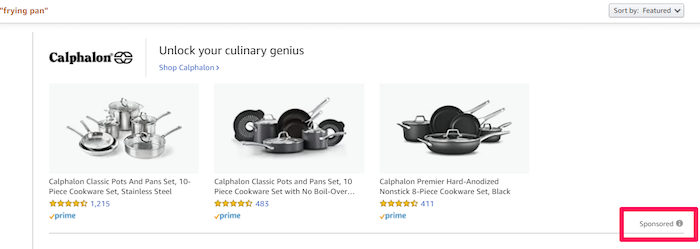
Here’s a look at the top of the search results for frying pans — see the word “sponsored” in the lower right corner?

That means sellers have paid to have their Calphalon pans show up at the top of the search results.

Amazon sponsored search results

They’re known as pay-per-click (PPC) listings.

PPC lets you bypass other product listings. Whenever someone clicks on your sponsored listing, you pay a fee, but you get a prime spot for a specific keyword in return.

Of course, there’s no guarantee buyers will click your listing, but some sellers use this technique alongside their organic search strategies.

We’re not focusing on PPC in this article…it’s a whole other beast.

But you should know that it’s available on Amazon just like other search engines, and that it’s responsible for the sponsored product listings you find in the search results.

Conclusion

Understanding Amazon keywords and Amazon SEO is critical if you want to be a successful seller on Amazon.

Keyword tools for Amazon can help you find the top keywords for your product listings, and they’re fast and straightforward to use.

You can always get started by searching for products like yours and see what keywords and listings come up.

How are your Amazon product listings performing now they’re optimized for SEO?

The post A Quick Guide to Using Keywords for Better Amazon SEO appeared first on Neil Patel.

from Blog – Neil Patel https://ift.tt/34dXu0e


from WordPress https://ift.tt/3l0VGOS

7 All-Too-Common Landing Page Errors You Must Avoid

And it does this 24 hours a day, 7 days a week, 52 weeks a year without ever asking for a pay raise.

But this is true only if your website landing page is designed well, maintained, and optimized to the gills. The art and science of a flawless landing page is beyond the scope of a single article, but we can start with helping you spot seven of the most common – and damaging – trouble spots.

1. Unclear Value Statement

Typically, new visitors to your page will only stay on it 3 to 15 seconds before they get distracted. In that span of time, you must offer a clear and visible reason to stick around and interact with the page.

That reason is your value statement. What value do your readers get in exchange for the time you ask them to spend? High-quality content is a must (and hopefully a given), but you also need to pull them in so they experience that content.

Does your landing page do that? If yes, great! If no, you should fix that. If you’re not sure, ask yourself:

  • Is there a compelling, visible headline that expresses the end benefits clearly and succinctly?
  • Is there a subheadline explaining your offering in more detail?
  • Are there supporting graphics that pull the eye toward your headline and subheadline?

If there aren’t, add them now.

2. Poor Signposting

Your landing page isn’t just there to be pretty. It’s meant to convince people to take action. If you don’t make it easy to find your call to action, most viewers won’t look for it.

deliver enough value to make it worth the hassle

You must make it clear — in as succinct and efficient terms as possible — why the action you want a reader to take will deliver enough value to make it worth the hassle. Tell them, in words that stand out from the rest of the page, what you want them to do next and what they’ll receive for doing so.

Improving your signposting stats by asking yourself the following questions:

  • Do you have a clear understanding of what the next step in a visitor’s customer journey should be?
  • Is it easy to find and take that step on your website?
  • Does your copy make a clear and compelling argument in favor of taking that step?

If you can answer yes to all three questions, your signposting is likely good (or at least good enough for now). If not, now you know what you have to do to improve it.

3. Slow Loading Time

Remember that 3 to 15-second maximum time limit we mentioned earlier? That span includes time spent waiting for your landing page to load, and every microsecond of that wait increases a reader’s likelihood of bailing on the whole thing. You must get your loading time to be as quick as possible.

Viewers who exit your landing page early – including while still waiting for it to load – increase your site’s bounce rate. Higher bounce rates reduce your rankings on Google and other search engines, meaning a page that loads too slowly not only impresses fewer viewers, but it also gets fewer viewers overall.

Improving your loading time is usually a job for your tech team or whoever in the office is responsible for overseeing your hosting service. That said, here are a few of the most important ways to optimize this important factor:

  • Optimize image size, file format, and compression;
  • Clean up your database by deleting saved drafts, old revisions, unused plugins, and similar virtual detritus;
  • Confirm that your WordPress theme (if applicable) is optimized for quick loading;
  • Use a content distribution network for file storage;
  • Analyze server response time with your hosting service, and work with them to reduce it;
  • Install tools that leverage browser caching;
  • Fix all your broken links;
  • Remove all render-blocking from JavaScript;
  • Reduce the number of redirects necessary to reach your page;
  • Optimize your code, especially in CSS, JavaScript, and HTML;
  • Enable file compression — except for on images;
  • Replace all PHP content with HTML wherever possible.

This is technical, detailed work, but it’s important. If you don’t have team members up to these tasks, it can be worth hiring an outside consulting company to do it for you.

4. Only One Landing Page

You have a good idea of your ideal customer’s hopes, fears, pain points, demographics, likes and dislikes, and other important information. If you have several different types of customers, you can’t use the same landing page for each of your customer groups. Each group has different characteristics that will prompt them to follow your call to action, so you don’t want to offer just one landing page.

Similarly, you also probably have more than one product or set of content and offerings to generate sales. Having only one landing page can lose leads because the page is only optimized for one of those products or content sets.

Ideally, you should have a unique landing page with a tailored offer for each of your customer models that would send those individuals to each of the products and content sets. An ad for professionals in their 30s making over $50,000 a year would lead to a landing page built for them, while an ad for heads of households working from home would lead to a landing page built for them.

Yes, that means a company with three profiles and four content sets would need 12 landing pages. And yes, it’s worth that kind of effort.

5. Insufficient Visuals

“A picture is worth 1,000 words” is ancient wisdom, but it’s far from true in the internet world – it’s actually worth more. A quick look at social media and blog performance will tell you many people will look at, enjoy, and share a photo or video, but not many will read an entire 1,000-word post on the same topic.

How well your landing page performs depends on the images you use and how you present them. Does your page’s layout conform to the best practices of visual web design:

  • Including images that emotionally reinforce the value expressions of your product’s core benefits;
  • Containing sufficient white space to not be intimidating;
  • Providing data images to indicate the worth of what you do;
  • Using visual design cues to lead the eye toward your conversion points;
  • Applying color gradients to highlight offers and your call to action;
  • Using infographics to replace the dreaded “wall of text”.

If you can say yes for half of these things, carry on. If not, this point may be among the better places to start with a landing page redesign.

6. Asking For Too Much, Too Soon

Craft a custom calls to action that meet all levels of interest, need, and desire

Not every landing page visitor is created equal. Some are hardcore fans and experts in what you do, ready for a 10,000-word white paper that dives deeply into the research supporting your use case. Others might have heard about your industry on an Instagram page and want to know the basics of what you do.

There’s nothing worse than going to a website and being asked for all of your personal information right away. If your call to action requires too much knowledge, too deep a commitment, or even too much personal information, consider scaling back. Otherwise, you risk turning away potential customers.

Better yet, go back to No. 5 above and build a new landing page for beginners and early-stage leads. Craft a custom calls to action that meet all levels of interest, need, and desire.

7. No Trust Elements

Offering some type of authentic customer referral or testimonial is important. It all boils down to the same thing: telling those who read your landing page that other people already like what you do and how you do it.

Examples of effective modern trust elements include:

  • Quotes from positive reviews next to a photo of the reviewer;
  • Screenshots of social media posts praising your company or product;
  • Short video interviews of happy clients;
  • Blurbs for industry thought leaders approving of you;
  • Images portraying business credentials and certifications;
  • Links to positive press coverage;
  • Logos of known business customers who buy and trust your brand.

Final Thought: What’s Next?

There isn’t one guaranteed way to turn a landing page from something full of holes into something perfect. But first, run an audit of your landing page using this list as a guide. Note which errors are there. Next, sort them in order of what takes the least time to fix to what takes the most time to fix.

Then, fix them in that order. We find that getting the quick fixes done builds excitement and momentum, whereas starting with a harder fix can mire down the whole process.

If none of these errors exist on your landing page, congratulations. There’s still lots of work to do on your website and content marketing, but it’s not among these rookie mistakes.


Featured image via Pexels.

Source

p img {display:inline-block; margin-right:10px;}
.alignleft {float:left;}
p.showcase {clear:both;}
body#browserfriendly p, body#podcast p, div#emailbody p{margin:0;}

from Webdesigner Depot https://ift.tt/3n57O3c


from WordPress https://ift.tt/36rP340

Thursday, October 1, 2020

Contact Us Page Tips: Move From Blah to Yeah!

contact us page tips

A visitor hits your website and wants to talk to you. What does that person start searching for?

Your Contact Us page.

It’s a page on your site that pushes visitors from browser to buyer.

Contact Us pages are among the most underutilized and misunderstood resources on the web today.

Some companies don’t use them at all, and those that do have them often push these critical pages to the back burner during website revision projects.

That stops today.

I’ll share a step-by-step plan you can follow to strategize and revise this lowly web page. And I’ll use plenty of examples to spark your creativity.

Let’s get started.

What Is a Contact Us Page?

Think of a Contact Us page as a sort of digital business card. Sure, it’s short and concise. But if someone wants to reach out to you, they’ll use this page to do so.

Contact Us pages often get lumped in with other critical website resources, including:

  • About Us pages: Use this resource to explain your company’s history, goals, and direction. If someone wants to know how you became a leader in your field, the data is ready to go.
  • Help pages: Customers with critical product or service questions lean on this page to get their answers.
  • Employment pages: Job seekers need private, protected spaces to learn more about open opportunities.

A Contact Us page is different because you’re telling people more about getting in touch with you.

Your page should also embody your brand and entice that click. If your Contact Us page is the blandest one on your website, you’re not alone. The best contact us pages contain some value proposition, even when they don’t have a lot of text.

Do You Need a Contact Us Page?

A Contact Us page can’t be skipped because it is a trust signal. Share location information and highlight your phone number and email, and you’ll demonstrate to wary consumers that they can reach you at any time.

Trust and transparency matter in marketing. Contact Us pages start the process.

Five Key Contact Us Page Elements

You know you need a Contact Us page. But you have no idea what to put on the page. Push past the writer’s block, and follow this recipe for success.

A converting Contact Us page contains these critical pieces:

  1. Your company name: Don’t beat around the bush. Use your full company name.
  2. Your physical address: This can get tricky for multi-location companies. Maps often solve the problem (and more on that in a minute). If you share only one address, use the one associated with your corporate headquarters.
  3. A map to your location: Google Maps hold immense power for marketers. When customers know where you are, even when they’re looking at a mobile device, your conversion rates can skyrocket. Boost that power by adding a Google Map to your Contact Us page.
  4. Your contact information: Include a phone number, email address, and a quick data-collection form. Customers need plenty of calls to action. Fight off spam with a CAPTCHA as well.
  5. Links to relevant pages: If you know customers have product questions, show them to your Help page. If you have plenty of job seekers, highlight that Jobs page.

Don’t be tempted to clutter up the page with more details and data. Keep things clean and streamlined with this list.

Build the Perfect Contact Us Form

If you’re looking for a way to streamline customer conversations, forms are key. If you build forms correctly, routing questions is a snap.

Your form could include several fields, including:

  • Name
  • Location
  • Current customer (Y/N)
  • Question
  • Email address
  • Phone number

You might be tempted to add all of these fields to your form. The more data you have, the better, right?

Not always.

When customers face a sea of questions, they tend to click away. Form completion rates and added fields are inversely related.

To keep those conversion rates up and deliver exceptional user experience, only ask critical questions.

10 Exceptional Contact Us Page Examples

I’ve talked a lot about what should and shouldn’t go on a Contact Us page.

These ten companies have lessons anyone can apply.

Streamlined and Simple: Scorpion

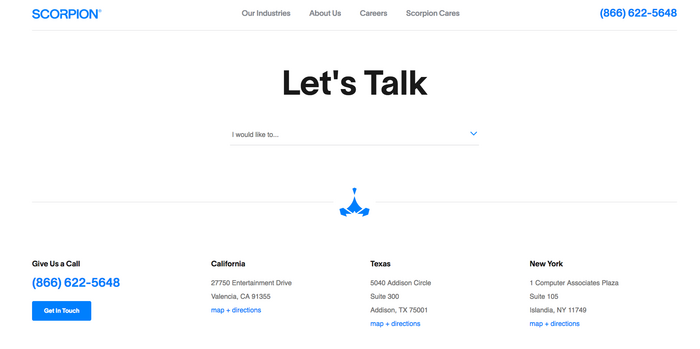
Scorpion offers internet marketing services to law firms, hospitals, franchises, and more. The company shows off robust design skills on all other web pages. But this one is remarkable in its simplicity.

Customers answer one simple question with a dropdown. The answer routes them to an appropriate secondary form.

Scorpion contact us page example

Customers can also skip the hassle of forms altogether, call the number in the top-right corner of the screen, or visit one of three locations listed at the bottom of the page.

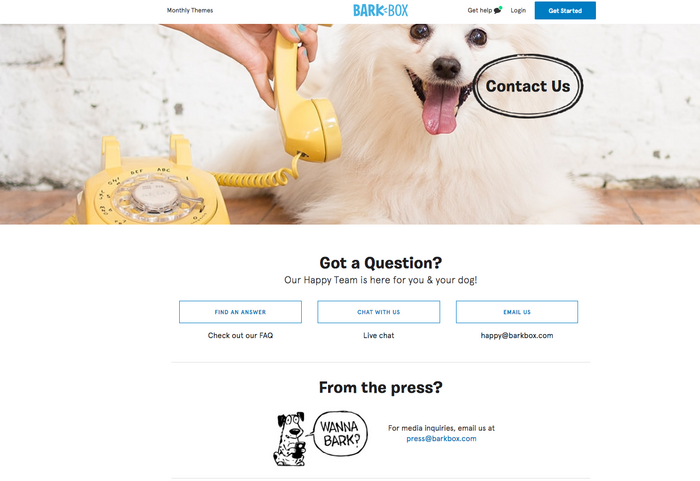
Brand Promise First: BarkBox

A subscription service for happy dogs should have a dog’s photo on a Contact Us page. And that dog should look happy. BarkBox has that element covered.

barkbox contact us page example

Customers have three different contact options sitting below that big image. They can search FAQs, start a live chat, or send an email. It’s a simple, streamlined interface made for busy dog lovers.

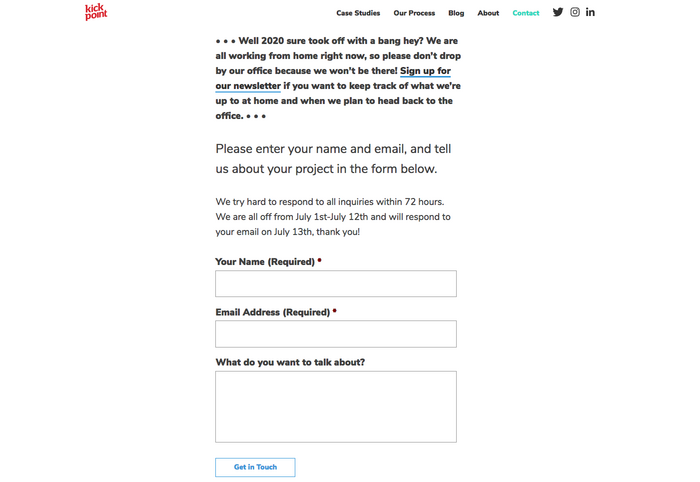
Personality Plus: Kick Point

This Canadian marketing firm kicks off the About Us page with a chatty, conversational tone.

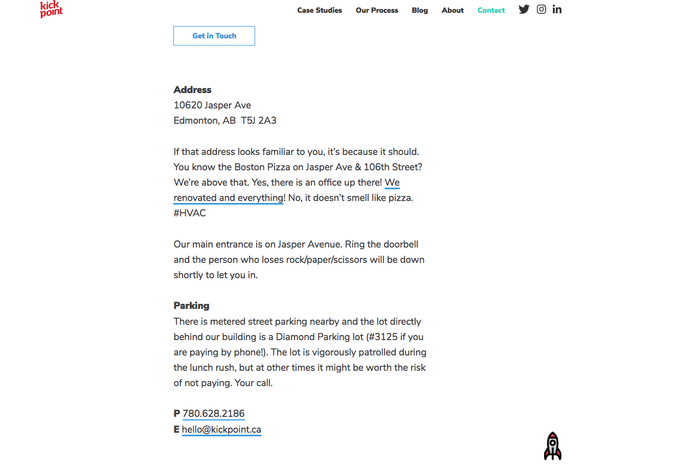
Keep scrolling, and that clever voice keeps speaking. When you reach the bottom of this page, you know just how these employees talk and write.

kick point contact us page example
another kick point contact us page example

The cleverness doesn’t impede clear communication. You’re told the company’s address, email address, phone number, and more.

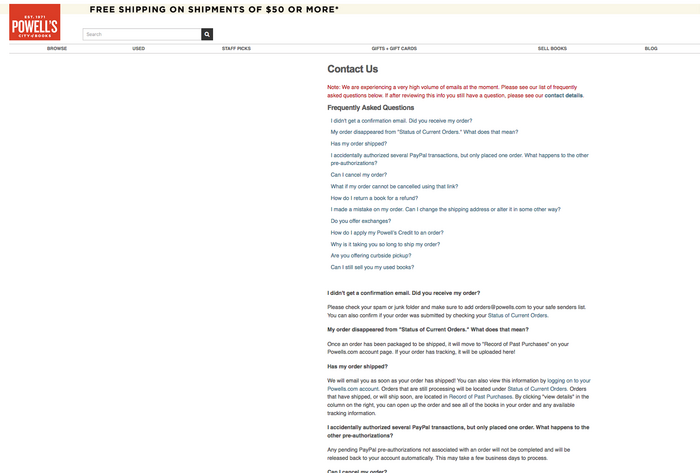
Crisis Communication: Powell’s Books

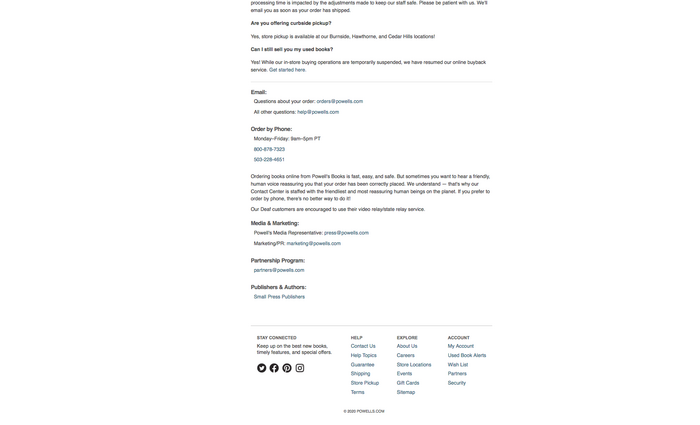
Powell’s puts customer communication front and center on this Contact Us page. Timely content about shipping delays comes first. Keep scrolling, and you’re taken to email addresses and phone numbers.

powell's contact us page example
powell's books contact us page example

Typically, converting Contact Us pages are short. But you can break the rules when the unexpected happens.

Arresting Graphics: Parker Lee

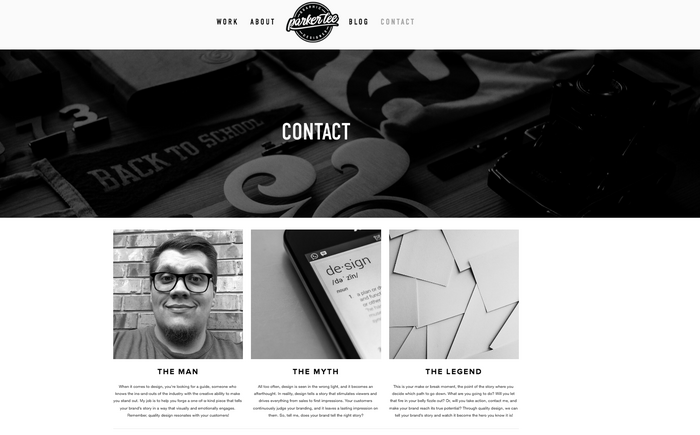
People hire Parker Lee to design logos, websites, and other branded elements. He puts those skills to work on this visually arresting Contact Us page. The page begins with a brand statement, but scrolling past that is a snap.

parker lee contact us page example
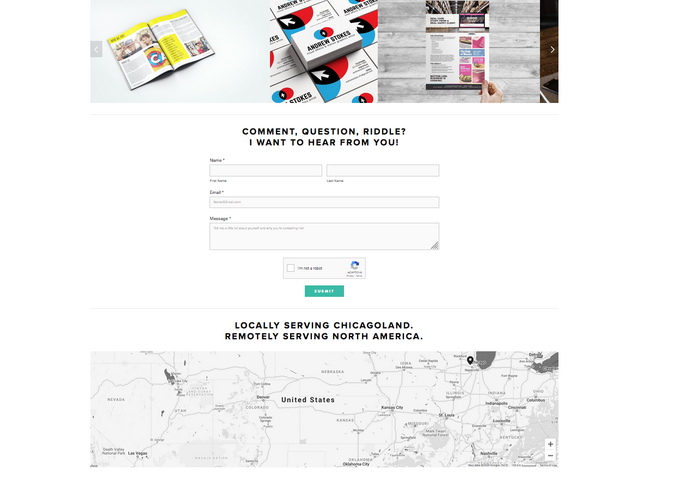
parker lee contact us page example map

A simple form with just four fields appears, and a clever map rounds out the page.

Forms Do the Hard Work: Six Leaf Design

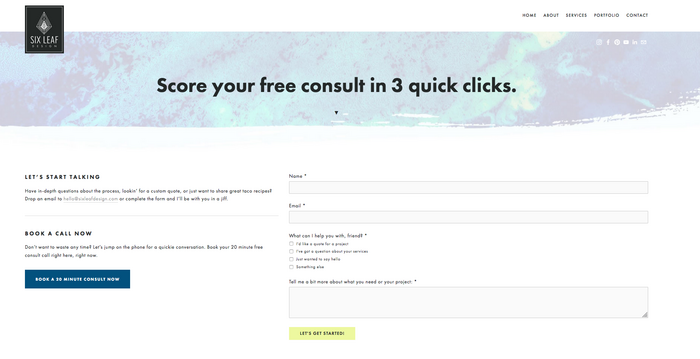
This company emphasizes sales on this Contact Us page. A three-field form, with a tiny multiple-choice quiz, gets potential customers a price quote.

sixleaf contact us page example

A blue button for anxious customers leads right to a 20-minute consult appointment. For companies hoping to emphasize lead generation, this is a smart model to follow.

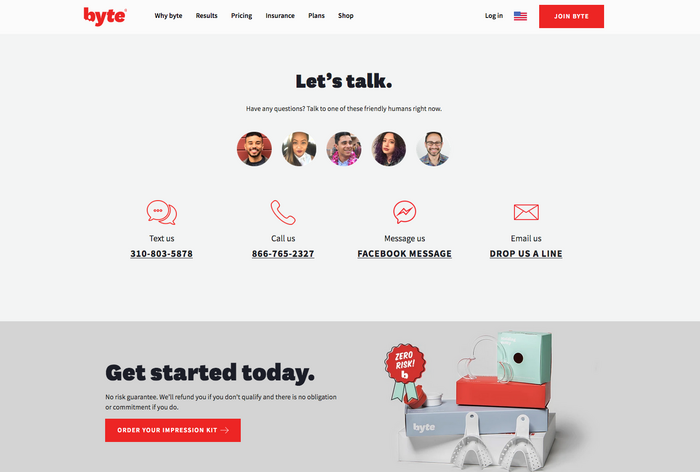
Friendly Faces: Byte

Who will customers talk to when they reach out? Byte answers this question with photos of real-life customer service reps ready to respond to questions.

byte contact us page example

Choose from multiple contact formats, including text, email, Facebook message, and email. All of this data is streamlined, so white space surrounds the page.

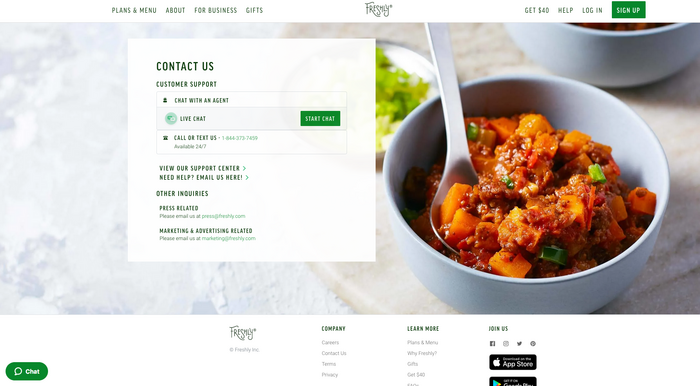
Product Photography: Freshly

Freshly offers meal-kit delivery services, and an enticing product takes up about half of this Contact Us page. Putting the product first could attract customers to jump into a purchase.

freshly contact us page example

The contact box is the clever bit. Customers can chat, call, text, or skip to email.

This is a simple, friendly interface that puts the product first.

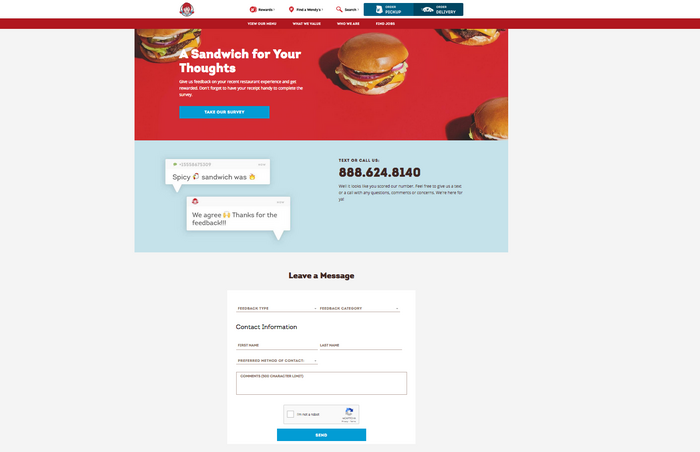
Multi-Location Mastery: Wendy’s

How do you handle inquiries when customers have dozens of locations to choose from? Wendy’s handles this question with a “Find Wendy’s” button at the top of the page.

wendys contact us page example

Customers with questions can text or call a number displayed in big, black text. It’s nearly impossible to miss. A clever, short form rounds out the page.

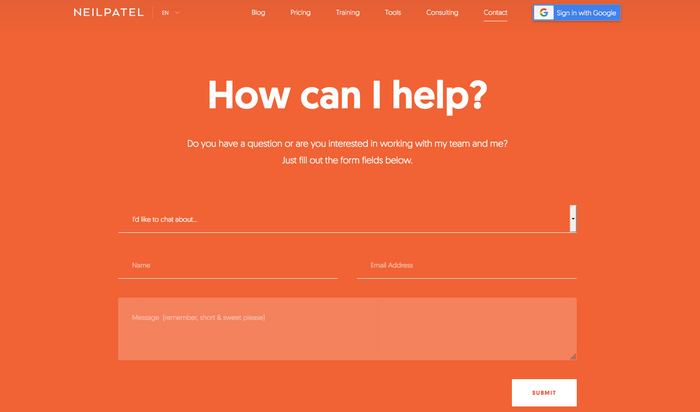
Short and Sweet: My Own

I put best practices to use on my website’s Contact Us page. I use a drop-down to route questions, and I ask customers to fill out just three fields.

I keep the branding light on this page, but the colors remind my guests that they’re still on my site.

neil patel contact us page example

I also link to relevant social media sites to follow me through those platforms. My digital marketing consulting contact form is similar. Short and sweet with just the information I need to know.

Contact Us Page Do’s and Don’ts

We’ve walked through several examples of pages that convert. And we’ve shared quite a few tips you can put to use right now.

But there’s more to learn.

As you’re working on your Contact Us page, be sure to:

  • Be a good journalist. Put the important stuff first. Your visitors are there to connect with you. Make those opportunities easy to find and deliver an exceptional user experience. Save the rest for last.
  • Promote your page like a pro. Put a link to your page in your email signature and link it to your social media accounts. Make sure customers know you’re interested in a connection.
  • Link to your page. Customers look in the top-right corner of a page for Contact Us links. Make sure each page on your site connects to that critical page.

Before you publish your Contact Us page, be sure to avoid:

  • Cluttered design. Don’t fill the space with tons of graphics, jokes, or text blocks. Respect what your consumers are there to do – contact you.
  • Overconfidence. Use A/B testing to find the design your customers want. Don’t be overconfident about your design prowess — you might be surprised by what works!
  • A desktop-first mentality. Test your site on mobile devices. Try out the form fields. Plenty of customers will visit you on the go; make sure their experience is a good one.

It takes time to design a Contact Us page that converts. Don’t be afraid to slow down, test, and head back to the drawing board. You can’t afford to make mistakes on such an essential piece of your website.

Conclusion

Your Contact Us page is one of the most critical assets on your website. People head here when they want to reach you. Make that communication as quick and painless as possible.

Publish with confidence, and watch those conversion rates. If you don’t see the response you want, change it!

With experimentation and vigilance, you can develop the right Contact Us page that works for your customers, your company, and your community.

Is your current Contact Us page lacking? What can you change to make it more effective?

The post Contact Us Page Tips: Move From Blah to Yeah! appeared first on Neil Patel.

from Blog – Neil Patel https://ift.tt/3ilCbPs


from WordPress https://ift.tt/30rIXx0